Scoring SavvyWriter Assignments
After a student has completed the Write portion of their SavvyWriter assignment, their score is tabulated into a chart visible in your Data tab. This table shows the class average for the assignment based off of each student's mastery of the scoring criteria. The Essay Scorer grades the response based on whether content fitting the scoring criteria is present. For example, if the essay assignment directs students to compare and contrast two provided articles, then Essay Scorer grades the assignment while aware of these articles. You can still edit a student's score from the assignment review page. Below is an example of a typical table breaking down scores for a SavvyWriter assignment:
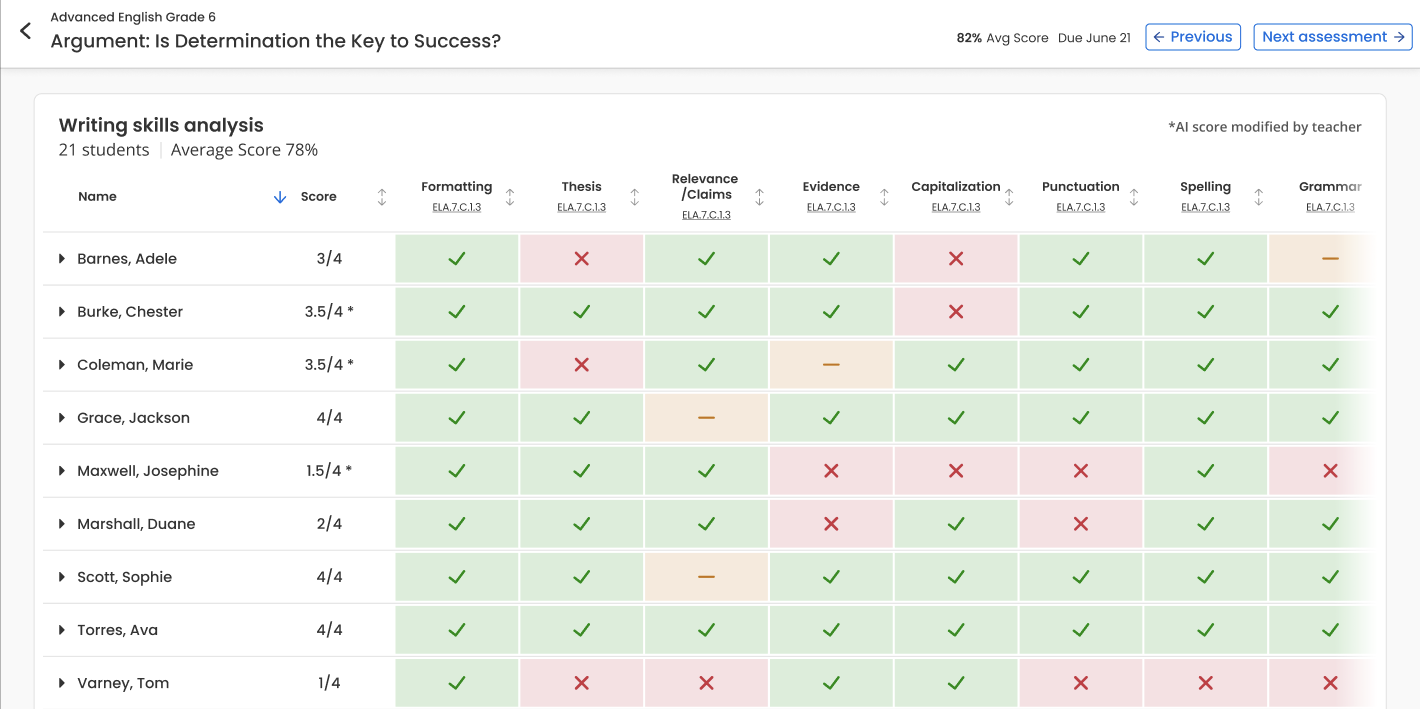
Each score is associated with one or more standards, which you can select to bring up more information about those standards. Scoring is based on mastery, rather than a number indicator:
-
Green Check Mark: The student displays mastery of the scoring criteria.
-
Yellow Check Mark: The student displays developing mastery of the scoring criteria.
-
Red Check Mark: The student displays beginning mastery of the scoring criteria.
You can sort the results of the table based on the overall score, as well as by each scoring criteria.