Teachers and Year End
Savvas Realize uses a centralized process to prepare for the new school year. This process is called New Year Rollover, or NYR.
Realize administrators can view their district’s New Year Rollover date directly in Realize by going to New Year Rollover on the District page.
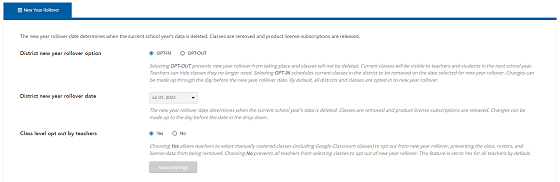
During New Year Rollover, the following processes are completed:
- Classes from last year are deleted.
- Students are removed from classes.
- Product license subscriptions are released to make available for the upcoming year.
- Student progress data is deleted.
The New Year Rollover process does not remove teacher content they have created, customized, or uploaded. Teacher and student accounts also remain in the system and should be reused each school year.
After New Year Rollover completes, administrators can upload new classes on Realize and teachers can create classes manually on Savvas Realize.
All districts are required to complete New Year Rollover, which takes place at the end of each academic school year. A district can choose not to delete last year’s classes. This is referred to as “opting out.” See the Opt Out of Deleting Last Year’s Classes help file for more information.
 Class Opt Out for Teachers
Teachers have the ability to opt out of specific manually rostered classes if the district keeps this default setting enabled. To view the district's new year rollover configurations, follow the steps below.
- Login to Realize with the district administrator account.
- Select the drop down for the District page, and select New Year Rollover.
- Select the radio button for No. This prevents all teachers from selecting classes in Realize to opt out of new year rollover. By default, this setting is enabled and set to Yes. For their manually rostered classes in Realize, teachers see an option to retain that class for the next school year. See Class Settings for New Year Rollover in the Realize teacher help to learn more.
To see options teachers have in Realize if the class opt out is enabled for the district, refer to the Class Settings for New Year Rollover help file in the Realize online help for teachers.