EasyBridge Release Notes
The EasyBridge Release Notes provide descriptions of the major feature enhancements, resolved issues, and known issues for a release.
Release 26.7.20
Transitioning Easybridge Features & iLit Access to Realize
Overview: As part of our ongoing commitment to streamlining platform access, Easybridge features and iLit product management are fully transitioning to Realize. This update provides a single, unified destination for classroom learning and administration.
1. Seamless Redirection to Realize
-
Automated Navigation: Any attempt by teachers or students to access Easybridge—whether entering a direct URL or using a saved bookmark—will now automatically redirect seamlessly to Realize.
-
Single Destination: This update streamlines daily platform workflow by bringing teachers and students directly into Realize for all instructional and learning activities.
2. iLit Class Management & Access in Realize
-
Integrated iLit Access: All product features and learning access previously available in Easybridge for iLit products are now fully supported within Realize.
-
Class Compatibility: iLit products are specifically available for Auto/Plus classes.
-
Assignment Validation: Built-in system validation ensures that only one iLit product is assigned per class, keeping class setups organized and error-free.
Quick Feature Reference
| Feature/Function | Previous Behavior (EasyBridge) | Updated Behavior (Realize) |
| Platform Access | Direct access via EasyBridge URLs or Bookmarks | Automatic redirection directly into Realize |
| iLit Class Access | Managed within EasyBridge Platform | Now Managed within Savvas Realize |
| iLit Assignment Validation | Multiple products allowed per class setup | System validates maximum 1 iLit product per class |
 Release 25.7.20 - July 30, 2025
Announcements
Savvas is pleased to announce that we now support Dual Enrollment offerings. District administrators can now conveniently manage Dual Enrollment Cohort Dates directly from the Schools page in EasyBridge. This functionality allows administrators to set start and end dates for Outlier products at a school organization level, which are essential for these dual enrollment offerings. Once a Cohort start date has been selected for their school, teachers will be able to assign Dual Enrollment products in Realzie when creating or modifying a class.
Teachers, we've made some helpful enhancements to your class management!
We have repurposed the Hidden Classes page to an Inactive Classes page. This page allows you to view classes you have previously hidden as well as classes that do not have any programs associated. This new page also allows integrated teachers to bypass EasyBridge and add programs directly to classes from within Realize. On this page, you can see important details for each class, such as its name, rostering source, Google integration status, and start/end dates. From here, you can also easily unhide classes to bring them back to your active list.
Additionally, you can now manage and remove programs from your classes directly through the Class Settings. For EasyBridge Basic classes, teachers can add and remove programs by default. For Auto and Plus classes, this capability may be available if enabled by your Savvas administrator. If you remove the final program from a class, it will become inactive, making the class and its assignments inaccessible to students, but it will still be available to you under the Inactive Classes section.
Release 25.7.15 - July 23, 2025
Announcements
Easybridge is pleased to announce that we now support the OneRoster 1.2 API format. With the release of One Roster 1.2 API ingestions, customer admins will be able to be ingested through the nightly ingestion process and their accounts will be managed automatically through the process just like teacher and students. For more information and to determine if your install is compatible with OneRoster 1.2, please schedule an integration review with a Solutions Engineer.
Release 25.1.8 - January 16, 2025
Announcements
Easybridge is pleased to announce that we now support the OneRoster 1.2 CSV file format. With the release of One Roster 1.2 CSV ingestions, customer admins will be able to be ingested through the nightly ingestion process and their accounts will be managed automatically through the process just like teacher and students. For more information and to determine if your install is compatible with OneRoster 1.2, please schedule an integration review with a Solutions Engineer.
Release 24.12.6 - December 12, 2024
Resolved Issues
Teacher Self-Registration
Resolved: In some cases, when long emails were being used in the Teacher Self-Registration process, users may receive an error. This issue has been resolved and emails with 60 characters are supported.
Release 24.12.1 - December 3, 2024
Resolved Issues
Adding Programs to Classes
Resolved: In some cases, teachers were not seeing all available programs in the list when adding programs to classes.
Resolved: In some cases, when administrators searched for classes in EasyBridge using the Primary teacher, searcher results were not being returned.
Release 24.11.10 - November 14, 2024
Resolved Issues
Users Reporting Timeout Issues
Resolved: In some cases, teachers and admins were reporting being logged out of the system when clicking on Browse Content from EasyBridge.
Release 24.10.19 - October 19, 2024
Announcements
Easybridge is pleased to announce that we now support the ability to add a customer administrator that only has access to SuccessMaker without the need to give the administrator full EasyBridge Access. For more information on administrator permission please view the online help.
Release 24.9.7 - September 12, 2024
Resolved Issues
Users Reporting Timeout Issues
Resolved: In some cases, students that were removed from a file using the bulk update process were not removed front the system.
Release 24.9.2 - September 5, 2024
Announcements
Savvas is pleased to announce that we now support the ability for teachers to add student groups to Google classes in Realize. For more information on students and groups please view the online help.
Release 24.7.21 - July 31, 2024
Announcements
Savvas EasyBridge is pleased to announce that Customer Admins with the Realize Assessment permission can now Browse Realize Content within the new Realize Admin Dashboard. For more information on Browse Content please view the online help.
Release 24.6.10 - June 20, 2024
Announcements
Savvas is pleased to announce that Teachers can now assign and view grade levels for their individual classes under the class setting section on Realize. For more information on Class Settings and Grade levels, please view the online help.
Release 23.2.4 -February 9, 2023
Customer Administrator Support
EasyBridge administrators are now able to create other administrators within the organizations they belong to. They can now modify existing administrator information such as first name, middle name, last name, email address, organization, username, SIS user ID, password ,organization, Savvas Access and Email notifications.
EasyBridge administrators in auto-rostered organizations now have the ability to manually add co-teachers and substitute teachers to classes for their school or district outside of the integrated process. This allows administrators to easily and quickly provide temporary or permanent access to a class for a teacher.
Assessments Support
EasyBridge users can now take advantage of "Label the Diagram" functionality for the QTI 3.0 player. With this, you can drag image labels and place them in the appropriate hotspot location within an image (diagram) background.
EasyBridge users can now take advantage of "Sort into Container" functionality for the QTI 3.0 player. With this, you can drag text or image labels and drop them into a matching container which is also labeled.
EasyBridge users can now take advantage of "Fill in the Blank - Drag to Fill" functionality for the QTI 3.0 player. With this, the QTI 3.0 player can handle minimum answer requirements and maximum answer limits.
Easybridge users can now take advantage of "Multi-item Composite & Static Passage" functionality for the QTI 3.0 player. With this, the QTI 3.0 player can handle the ingestion of XML packages, render static passages, and handle basic left/right and top/bottom layouts.
Easybridge users can now take advantage of "Short Constructive Response" functionality for the QTI 3.0 player. With this, you can input text to answer a question with the help of formatting tools.
Release 22.8.0 -August 25, 2022
Co-teacher/Substitute Teacher Support
EasyBridge administrators in auto-rostered organizations now have the ability to manually add co-teachers and substitute teachers to classes for their school or district outside of the integrated process. This allows administrators to easily and quickly provide temporary or permanent access to a class for a teacher.
Release 22.7.9 -August 12, 2022
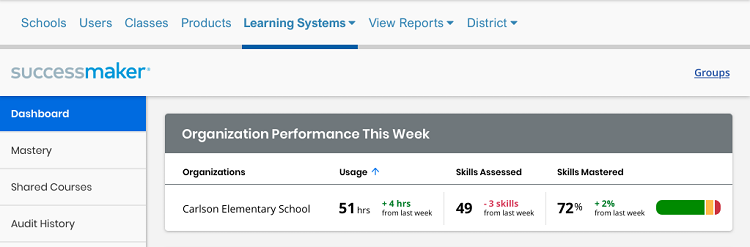
SuccessMaker Dashboard in EasyBridge for Administrators
EasyBridge administrators in districts who also subscribe to SuccessMaker now have more visibility into their students' progress with the new SuccessMaker Dashboard in EasyBridge. Administrators can navigate through different modules in EasyBridge to view:
- Overview of progress for a school
- Mastery of math and reading skills across the organization
- Courses shared across the organization
- Audit history
- Settings in SuccessMaker for the calendar and MSDA with the ability to modify
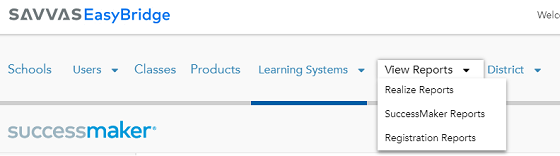
SuccessMaker Reporting in EasyBridge for Administrators
Administrators have a new, simplified way to go to their SuccessMaker reports from EasyBridge. From the View Reports drop down in the top navigation, admins can access SuccessMaker Reports with one select!
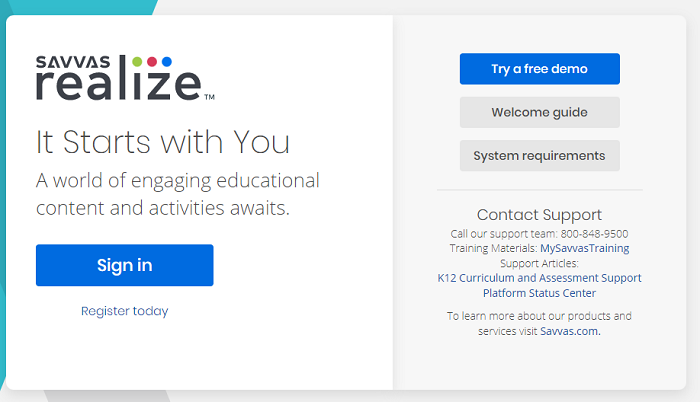
Redesigned Login Page for Users Experience
All Savvas users have a new pre-login experience when directly accessing Savvas programs. Changes were made to make the sign-in process more intuitive based on district configurations.
Special Characters for Password Creation -Some special characters are not recognized when entered during password creation. Enter a different character for your password to be accepted.
Release 22.7.0 - July 28, 2022
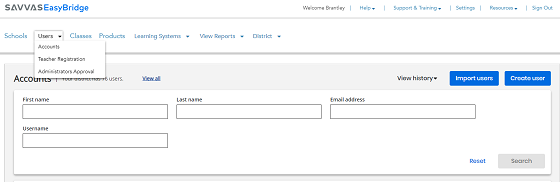
Updated User Management Experience
Starting with the 2022-2023 school year, EasyBridge allows you to set up your teacher’s manually rostered classes more quickly on the Savvas Realize™ Learning Management System and will include the following enhancements:
- More efficient user interface for search, filter, and management of users.
- Create users for your Savvas programs directly in Savvas EasyBridge - including individuals and bulk import.
- Import additional student demographic data through the EasyBridge user interface.
- Manually add as many instructional team members as needed to your classes through the EasyBridge user interface to support co-teachers and substitute teachers.
Release 22.6 - June 30, 2022
New Student Dashboard Design for EasyBridge Auto-Rostered Students
Students in auto-rostered districts have a new EasyBridge dashboard design! Access is the same, but students will notice a more streamlined look, allowing for easier navigation to their programs and curriculum assigned by their teachers. Changes are also designed to bring more cohesion between Savvas platforms. Students can more easily access their assignments when using mobile devices. Screens are fluid and match the size of the device.

Google Imported Classes Now Visible in EasyBridge for Students
Students now see Google Classroom™ imported classes in EasyBridge. These classes are easily identified with the Google Classroom™ icon to the left of the class name.

Release 21.8.11 - September 16, 2021
Admin tools to simplify user management
Administrators have a new tab in EasyBridge to search for users more effectively. The Manage Accounts tab on the Users page provides search features that return an individual account, or a group of users, depending on the criteria selected. Administrators select a specific user that takes them to the User Details page, providing critical information for troubleshooting and account information. Learn more on the Manage Accounts online help page.
Release 21.7.0 - July 29, 2021
Admin tools to help troubleshoot Google Classroom™ Linking
Administrators in auto-rostered (EasyBridge Plus) districts that also use Google Classroom™ can filter by, view, and manage class and student account linking directly on the Classes and Class Details pages in EasyBridge.
- Quickly Filter and Search by Auto Rostered classes + Only Show Linked Google Classes
- Find and select class marked with a link symbol indicating the class in Realize is linked to a corresponding Google Classroom™ class
- View Connected class information
- Disconnect the linked class
- View Connection History
-
Verify and manage current and historical Google accounts linking for a class and unlink if needed
Release 21.6.9 - July 23, 2021
Google Account Linking (EasyBridge Plus only)
EasyBridge Plus districts that also use Google Classroom™ now have the ability to match student accounts and classes for Realize and Google Classroom™.
- Teachers in auto rostered districts (EasyBridge Plus) will be able to link a Google Classroom™ class to an existing Realize class that has already been added from EasyBridge to avoid duplicates.
- All students using Google Classroom™ will be prompted to link their district login to their Google Classroom™ account. This process eliminates the creation of duplicate student accounts and will also eliminate duplicate classes and the need to hide them in Realize. This feature is enabled by default for EasyBridge Plus districts, and disabled by default for EasyBridge Auto districts.
Release 21.5.7 - June 17, 2021
New Year Rollover Configurations for ADMINISTRATORS (in Manually Rostered Districts only)
District administrators have the ability to select one of eight dates, ranging from June 25th to August 13th, on which their district's new year rollover will take place. Dates are listed in a drop down menu on the District page. Go to the New Year Rollover help page to learn more. If no date is selected, the default date of July 9th will be used for the district new year rollover. Changes can be made up through the day before the selected or default date. (This help link is only in the EasyBridge Basic help system, specifically for manually rostered classes.)
* Administrators in stand-alone schools (with no parent district) are considered school administrators and need to contact Customer Support to opt out of new year rollover or change the school new year rollover date.
Filter Option for All Administrators (Classes Page)
Administrators can filter on classes that have been opted out of new year rollover by a teacher. by checking a box on the Classes page. This allows administrators to quickly assess the impact of new year rollover as it relates to summer school.
Administrators can change the new year rollover status of a specific manually rostered class directly on the class details page. See Edit Class Details to learn how. (This help link is only in the EasyBridge Basic help system, specifically for manually rostered classes.)
Release 21.4.5 - May 13, 2021
New Year Rollover Configurations for ADMINISTRATORS
- District administrators have the option to opt all manually rostered classes out of the new year rollover process through EasyBridge. The default setting for all organizations is to remove all manually rostered classes, including Google Classroom™ classes, when new year rollover takes place.
- District administrators have the ability to allow their teachers to opt out of new year rollover at the class level for any manually rostered classes. This includes Google Classroom™ classes. The default setting is to allow teachers to opt out of manually rostered classes at the class level. Administrators should login to EasyBridge and update this configuration if they do not want their teachers to retain specific classes for the next school year.
For steps to change these new configurations, select the help page that applies to your district's rostering method.
See Pause Period (Auto Rostered Districts)
See New Year Rollover (Manually Rostered Districts)
New Year Rollover Configurations for TEACHERS
If district administrators have not changed the default configuration for new year rollover, teachers have the option to retain classes they select for the next school year. This option appears on their classes page in Realize. Teacher selections are retained if the district level setting is changed, but the district level setting overrides teacher level settings.
See Class Settings for New Year Rollover (Teacher online help for Realize)
Direct Access to My Savvas Training from EasyBridge
Administrators and teachers can link directly to the Savvas training site - MySavvasTraining.com - from the Help in the top navigation. The training site has extensive handouts and training videos to guide users through the platforms and provide answers in just a few selects. Go to Help -> Program Training.
Release 21.3.0 - March 25, 2021
Feature Enhancements
Administrator Products Page Enhancements
All administrators - both school and district - have access to the redesigned Products page in EasyBridge. New features include:
- Enhanced filter and sort capabilities
- Export either filtered information or complete product lists
- Thumbnail images when available for easier product recognition
Important Information
Sign In Help Resources
Go to the new channel on My Savvas Training to see a select group of resources designed to help you successfully sign in to your Savvas products.
https://mysavvastraining.com/channel/program/999-2626
Remote Learning & Teacher Resources
Looking for resources for teachers, students and parents? My Savvas Training continues to be updated with information, how to guides, and at-home learning resources. Keep this page bookmarked and check back regularly for updates.
Release 20.3.0 - August 27, 2020
Feature Enhancements
Sign In Assistance
More guidance for signing in to your Savvas programs is available directly on the sign in screen. Look for the new link under Need help with sign in? to help narrow down resources that can all users successfully login to their programs. See Sign In Help to learn more.

Context Sensitive Help
Administrators can access help for features directly on pages they are viewing. Going to the Help link gives the option to Get Help For This Page. See Use EasyBridge Help to learn more.
Hiding Classes in Realize
Classes hidden in Realize also hide the class in EasyBridge, unless it is also associated with products outside of Realize. See Hide a Class for more information.
Important Information
Sign In Help Resources
Go to the new channel on My Savvas Training to see a select group of resources designed to help you successfully sign in to your Savvas products.
https://mysavvastraining.com/channel/program/999-2626
Remote Learning & Teacher Resources
Looking for resources for teachers, students and parents? My Savvas Training continues to be updated with information, how to guides, and at-home learning resources. Keep this page bookmarked and check back regularly for updates.
Resolved Issues
Duplicate Emails
Admins will no longer receive duplicate emails when an account request is made.
Release 20.2.0 - July 31, 2020
Feature Enhancements
Email Enhancements for Admin Account Request
Look for the following product enhancements associated with administrator account requests:
- School and district names display in the all emails associated with an admin account request.
- Admins added by a Savvas employee display as Savvas Support in the "added by" column.
Pre-populated field for Teacher Self-Registration Admin Invites
Teachers who are invited to complete registration by an administrator from their school or district no longer need to search for their school. The school is pre-populated in the invitation from the administrator. (See Teacher Steps for Registration help to learn more.)
Important Information
Remote Learning & Teacher Resources
Looking for resources for teachers, students and parents? My Savvas Training continues to be updated with information, how to guides, and at-home learning resources. Keep this page bookmarked and check back regularly for updates.
Resolved Issues
Duplicate Emails
Admins will no longer receive duplicate emails when an account request is made.
Roster Data Import File
The Roster Data Import file export link under the district settings was causing a file download with no file extension for some administrators using certain web-browsers.
Duplicate Federated Id
The Duplicate Federated Id report under district data reports for EasyBridge Plus and EasyBridge Auto district administrators was not ignoring the case when comparing duplicates. This has been resolved.
Erroneous Emails
Some administrators received erroneous emails reporting Threshold Check Errors during the new year rollover process. This has been resolved.
Last Updated: August 03, 2026
Important: The information contained in this document is proprietary to Savvas. No part of this document may be disclosed to any third party outside your school or district, or used in any manner not authorized by Savvas.